MOVE operation can be used to convert integer values to character values. But in ILE free format, we have to use %CHAR built in function for that.
Let us define two variables
A char 10
B dec 10 0 Inz(2510)
MOVE B A
The value in A is now '0000002510'
A = %char(B)
The value in A is now ' 2510'
Main difference is leading zeros. Sometimes it is necessary to have leading zeros in variables. Therefore the below mentioned code can be used.
Evalr a = %editc(b:'4':*ASTFILL)
a = %xlate('*':'0':a)
%EDITC built in function converts numeric field into character field and edit the value according to the edit code. *ASTFILL fills the leading spaces with '*'. %XLATE function translate '*' to '0'.
Wednesday, August 1, 2007
Tuesday, July 31, 2007
Data queue programming
Follow the steps given below
1. Create a data queue.
CRTDTAQ DTAQ(Mylib/Mydataq) TYPE(*STD) MAXLEN(124) FORCE(*YES) SIZE(*MAX2GB 1000) TEXT('My first data queue')
2. Define a data structure in your RPG program. Please remember that, data structure is used to read and write data into the data queue according to an order. For our convenience we are defining 124 length data structure.
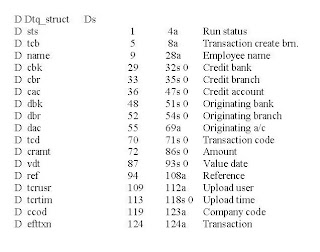
3. By calling the below mentioned program, you will be able to write data into the data queue.
Call 'QSNDDTAQ'
Parm Dataqueue (Name of the data queue)
Parm lib (Library of the data queue)
Parm len (Length of the data queue)
Parm Dtq_struct (Data structure)
4. Write another program to retrieve data from the data queue.
Call 'QRCVDTAQ'
Parm Dtqnam (Name of the data queue)
Parm Dtqlib (Library of the data queue)
Parm Dtqfldlen (Length of the data queue)
Parm Dtqfld (Data structure)
Parm Dtqwait (Amount of time to wait if no record exist in the data queue)
1. Create a data queue.
CRTDTAQ DTAQ(Mylib/Mydataq) TYPE(*STD) MAXLEN(124) FORCE(*YES) SIZE(*MAX2GB 1000) TEXT('My first data queue')
2. Define a data structure in your RPG program. Please remember that, data structure is used to read and write data into the data queue according to an order. For our convenience we are defining 124 length data structure.

3. By calling the below mentioned program, you will be able to write data into the data queue.
Call 'QSNDDTAQ'
Parm Dataqueue (Name of the data queue)
Parm lib (Library of the data queue)
Parm len (Length of the data queue)
Parm Dtq_struct (Data structure)
4. Write another program to retrieve data from the data queue.
Call 'QRCVDTAQ'
Parm Dtqnam (Name of the data queue)
Parm Dtqlib (Library of the data queue)
Parm Dtqfldlen (Length of the data queue)
Parm Dtqfld (Data structure)
Parm Dtqwait (Amount of time to wait if no record exist in the data queue)

Use FTP to receive IFS files
These simple steps describe how to perform a ftp function with AS400 folder system.
c:\ftp xxx.xxx.xxx.xxx
User (xxx.xxx.xxx.xxx:(none)): xxxxxxxxxx
Enter password.xxxxxxxxx
xxxxxxxxx logged on.
ftp> quote site nam 1
ftp> cd /qdls
now you are in QDLS folder
If you want to revert back, do the following steps.
ftp> cd /
ftp> cd qsys.lib
ftp> quote site nam 0
ftp> cd qgpl
c:\ftp xxx.xxx.xxx.xxx
User (xxx.xxx.xxx.xxx:(none)): xxxxxxxxxx
Enter password.xxxxxxxxx
xxxxxxxxx logged on.
ftp> quote site nam 1
ftp> cd /qdls
now you are in QDLS folder
If you want to revert back, do the following steps.
ftp> cd /
ftp> cd qsys.lib
ftp> quote site nam 0
ftp> cd qgpl
Subscribe to:
Posts (Atom)

